更新情報
- 2026/09/23: transcript に
bridge_statusが書き込まれなくなって URL が取れなくなっていたので、bridge-sessionから URL を組み立てる方法に更新しました。
背景
Pushover を使って、スマホに Claude Code から通知を送るようにしている。
通知にリモートコントロールの URL を設定すると、キーボードから離れているときにサッとスマホから許可や指示ができるんじゃないかと思って試してみた。
環境
- Claude Code v2.1.280
Enable Remote Control for all sessionsを有効化
やり方
WARNING
transcript の bridge-session エントリなど、ドキュメントに記載のないフィールドを参照しているため、将来のアップデートで動かなくなる可能性があります。
{ "$schema": "https://json.schemastore.org/claude-code-settings.json", "hooks": { "Notification": [ { "matcher": "", "hooks": [ { "type": "command", "command": "\"$CLAUDE_CONFIG_DIR\"/_scripts/notification.sh" } ] } ] }}input=$(cat)
TRANSCRIPT_PATH=$(echo "$input" | jq -r '.transcript_path // ""')# .transcript_path には次のようなパスが入っている。# "/Users/.../.config/claude/projects/.../6782c440-....jsonl"
REMOTE_URL=""if [[ -n "$TRANSCRIPT_PATH" && -f "$TRANSCRIPT_PATH" ]]; then # resume や continue のたびにエントリが追加されるので、最後のものを使う。 # bridgeSessionId "cse_XXX" が https://claude.ai/code/session_XXX に対応する。 REMOTE_URL=$(jq -r 'select(.type == "bridge-session") | .bridgeSessionId // empty' "$TRANSCRIPT_PATH" \ | tail -n 1 | perl -ne 'print "https://claude.ai/code/session_$1" if /^cse_(\w+)$/')fi
# REMOTE_URL を通知の内容に追加して、Pushover に送る。通知に使っているスクリプトの全体は以下。 デスクトップとスマホに通知を送っている。
#!/usr/bin/env bash
# Read JSON input from stdininput=$(cat)
MESSAGE=$(echo "$input" | jq -r '.message // ""')NOTIFICATION_TYPE=$(echo "$input" | jq -r '.notification_type // ""')CWD=$(echo "$input" | jq -r '.cwd // ""')TRANSCRIPT_PATH=$(echo "$input" | jq -r '.transcript_path // ""')
# Build title with repo/worktree nameif git -C "$CWD" rev-parse --is-inside-work-tree &>/dev/null; then REPO_NAME=$(git -C "$CWD" remote get-url origin 2>/dev/null | perl -pe 's/.*\///; s/\.git//') WORKTREE_NAME=$(basename "$(git -C "$CWD" rev-parse --show-toplevel)") if [[ -n "$REPO_NAME" && "$REPO_NAME" != "$WORKTREE_NAME" ]]; then TITLE="Claude Code: ${REPO_NAME} (${WORKTREE_NAME})" else TITLE="Claude Code: ${WORKTREE_NAME}" fielse TITLE="Claude Code: $(basename "$CWD")"fi
# Build remote control URL from the latest bridge-session entry in transcript# (resume/continue creates a new entry, so we need the last one).# The entry has no URL; bridgeSessionId "cse_XXX" maps to https://claude.ai/code/session_XXXREMOTE_URL=""if [[ -n "$TRANSCRIPT_PATH" && -f "$TRANSCRIPT_PATH" ]]; then REMOTE_URL=$(jq -r 'select(.type == "bridge-session") | .bridgeSessionId // empty' "$TRANSCRIPT_PATH" \ | tail -n 1 | perl -ne 'print "https://claude.ai/code/session_$1" if /^cse_(\w+)$/')fi
case "$NOTIFICATION_TYPE" in idle_prompt) NOTIFY_MSG="入力を待っています" ;; auth_success) exit 0 ;; permission_prompt) if [[ "$MESSAGE" == 'Claude needs your permission to use '* ]]; then NOTIFY_MSG="${MESSAGE#Claude needs your permission to use }の許可が必要です" else NOTIFY_MSG="許可が必要です" fi ;; *) [[ -z "$MESSAGE" ]] && exit 0 NOTIFY_MSG="${MESSAGE}" ;;esac
[[ -n "$CC_NOTIFICATION_DISABLED" ]] && exit 0
# Desktop notification# alerter はデフォルトでユーザー操作を待つので、--timeout でプロセスが残り続けないようにする# 加えて、フックを止めないよう必ずバックグラウンド実行するalerter --message "$NOTIFY_MSG" --title "$TITLE" --sound default --timeout 60 --content-image 'https://uxwing.com/wp-content/themes/uxwing/download/brands-and-social-media/claude-ai-icon.png' >/dev/null 2>&1 &
# Pushover notificationPUSHOVER_ARGS=( --form-string "token=${CC_PUSHOVER_API_KEY}" --form-string "user=${CC_PUSHOVER_USER_KEY}" --form-string "message=${NOTIFY_MSG}" --form-string "device=iphone" --form-string "title=${TITLE}")if [[ -n "$REMOTE_URL" ]]; then PUSHOVER_ARGS+=(--form-string "url=${REMOTE_URL}" --form-string "url_title=Open Remote Control")ficurl -s "${PUSHOVER_ARGS[@]}" https://api.pushover.net/1/messages.json > /dev/null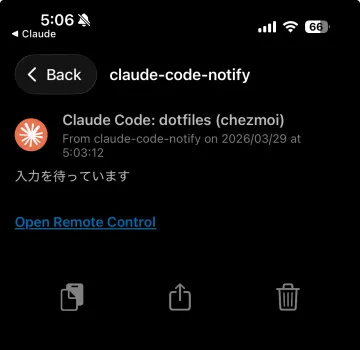
Open Remote Control をタップすると、スマホの Claude アプリが起動して、ダイレクトにセッションを開くことができます。便利。
おわりに
私は Pushover を使っていますが、Slack とか Discord とかでも応用できます。
正直、めちゃくちゃ役に立つ感じではないですが、あって損はないなとも思います。