背景
Pushover を使って、スマホに Claude Code から通知を送るようにしている。
通知にリモートコントロールの URL を設定すると、キーボードから離れているときにサッとスマホから許可や指示ができるんじゃないかと思って試してみた。
環境
- Claude Code v2.1.86
Enable Remote Control for all sessionsを有効化
やり方
WARNING
bridge_status など、ドキュメントに記載のないフィールドを参照しているため、将来のアップデートで動かなくなる可能性があります。
{ "$schema": "https://json.schemastore.org/claude-code-settings.json", "hooks": { "Notification": [ { "matcher": "", "hooks": [ { "type": "command", "command": "\"$CLAUDE_CONFIG_DIR\"/_scripts/notification.sh" } ] } ] }}input=$(cat)
TRANSCRIPT_PATH=$(echo "$input" | jq -r '.transcript_path // ""')# .transcript_path には次のようなパスが入っている。# "/Users/.../.config/claude/projects/.../6782c440-....jsonl"
REMOTE_URL=""if [[ -n "$TRANSCRIPT_PATH" && -f "$TRANSCRIPT_PATH" ]]; then REMOTE_URL=$(jq -sr '[.[] | select(.subtype == "bridge_status") | .url] | last' "$TRANSCRIPT_PATH")fi
# REMOTE_URL を通知の内容に追加して、Pushover に送る。通知に使っているスクリプトの全体は以下。 デスクトップとスマホに通知を送っている。
#!/usr/bin/env bash
# Read JSON input from stdininput=$(cat)
MESSAGE=$(echo "$input" | jq -r '.message')CWD=$(echo "$input" | jq -r '.cwd // ""')TRANSCRIPT_PATH=$(echo "$input" | jq -r '.transcript_path // ""')
# Build title with repo/worktree nameif git -C "$CWD" rev-parse --is-inside-work-tree &>/dev/null; then REPO_NAME=$(git -C "$CWD" remote get-url origin 2>/dev/null | perl -pe 's/.*\///; s/\.git//') WORKTREE_NAME=$(basename "$(git -C "$CWD" rev-parse --show-toplevel)") if [[ -n "$REPO_NAME" && "$REPO_NAME" != "$WORKTREE_NAME" ]]; then TITLE="Claude Code: ${REPO_NAME} (${WORKTREE_NAME})" else TITLE="Claude Code: ${WORKTREE_NAME}" fielse TITLE="Claude Code: $(basename "$CWD")"fi
# Extract remote control URL from the latest bridge_status entry in transcript# (resume/continue creates a new entry, so we need the last one)REMOTE_URL=""if [[ -n "$TRANSCRIPT_PATH" && -f "$TRANSCRIPT_PATH" ]]; then REMOTE_URL=$(jq -sr '[.[] | select(.subtype == "bridge_status") | .url] | last' "$TRANSCRIPT_PATH")fi
case "$MESSAGE" in 'Claude is waiting for your input') NOTIFY_MSG="入力を待っています" ;; 'Claude Code login successful') # do nothing exit 0 ;; 'Claude needs your permission to use '*) NOTIFY_MSG="${MESSAGE#Claude needs your permission to use }の許可が必要です" ;; *) NOTIFY_MSG="${MESSAGE}" ;;esac
# Desktop notificationESCAPED_MSG="${NOTIFY_MSG//\[/\\[}"terminal-notifier -message "$ESCAPED_MSG" -title "$TITLE" -sound default -contentImage 'https://uxwing.com/wp-content/themes/uxwing/download/brands-and-social-media/claude-ai-icon.png'
# Pushover notificationPUSHOVER_ARGS=( --form-string "token=${CC_PUSHOVER_API_KEY}" --form-string "user=${CC_PUSHOVER_USER_KEY}" --form-string "message=${NOTIFY_MSG}" --form-string "device=iphone" --form-string "title=${TITLE}")if [[ -n "$REMOTE_URL" ]]; then PUSHOVER_ARGS+=(--form-string "url=${REMOTE_URL}" --form-string "url_title=Open Remote Control")ficurl -s "${PUSHOVER_ARGS[@]}" https://api.pushover.net/1/messages.json > /dev/null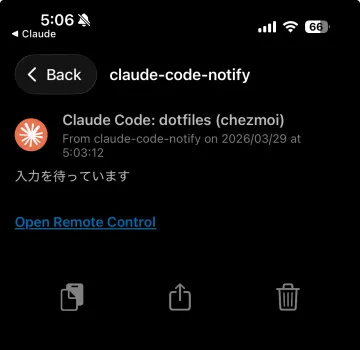
Open Remote Control をタップすると、スマホの Claude アプリが起動して、ダイレクトにセッションを開くことができます。便利。
おわりに
私は Pushover を使っていますが、Slack とか Discord とかでも応用できます。
正直、めちゃくちゃ役に立つ感じではないですが、あって損はないなとも思います。